
How Far Can AI Take Video Management? VideoTagger's Design Philosophy and Roadmap
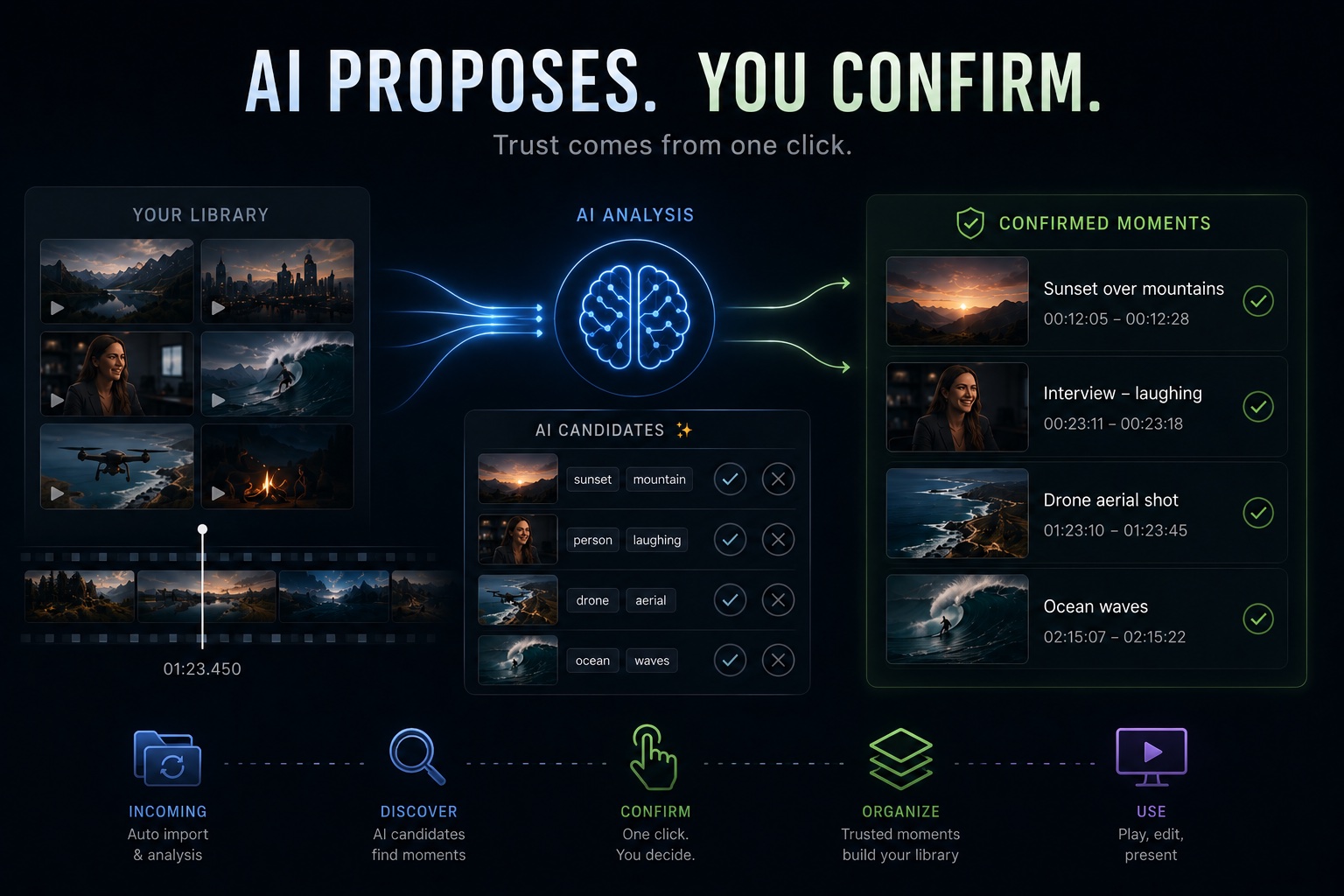
"AI-powered video management" — every tool promises it now, VideoTagger included. But the moment you actually put AI in charge of a working video library, a different question surfaces: can you trust what it tells you?
This post explains how VideoTagger answers that question — the design philosophy at the core of the product — and where we are taking it next.
Why Video Management Stays Inefficient
A video is an opaque file with a time axis. With photos, a wall of thumbnails tells you everything at a glance. With video, knowing a file exists tells you almost nothing about what is inside it.
And what people actually remember is not a filename. It is a moment: "the part of the interview where she laughed," "the shot just before the drone touched down." The meaning lives at a specific time inside the file.
Physical layer (files, folders) ←── the gap ──→ Meaning layer (moments you remember)
Folders and filenames only manage the left side. Bridging that gap by hand means opening files and scrubbing — time that grows without limit as the library grows. That is the real inefficiency of video management. AI is the first technology that can bridge the gap cheaply.
The Core Unit: Moments, Not Files
Everything in VideoTagger is built around one unit: a Moment — a specific point or range of time inside a video.
| Shape | Range | Example |
|---|---|---|
| Whole file | Start to end | "Hawaii Trip 2025.mp4, the whole thing" |
| Scene | A start–end range | "The smile in the interview, 2:30–2:45" |
| Single frame | One exact point | "Drone touchdown at 01:23.450" |
A file, a scene, and a single decisive frame are all the same thing internally: a Moment. Tagging, search, and collections all operate on the same unit, so you never have to think about which "mode" you are in. The v1.4 main-flow rebuild was about carrying this Moment-centric design through the entire product.
The Design Principle: AI Proposes, You Confirm
This is the most important part of VideoTagger's design.
AI recognition is probabilistic. Even at 90% accuracy, one result in ten is wrong. For organizing hobby footage, fine. But for professional use — pulling up the clip in front of a client, finding the right material the night before a deadline — a "probably correct" search result is useless.
Skip AI entirely, though, and you are back to bridging the gap by hand. VideoTagger resolves this dilemma by splitting your data into two explicit layers:
| AI candidate layer | Confirmed layer | |
|---|---|---|
| Created by | AI, automatically in the background | You, with a single click |
| Reliability | Candidates — hits and misses | 100% deterministic |
| In the UI | Marked "unconfirmed" with a ✨ | Regular tags and collections |
| Used for | Discovery, a working draft | Production — sales, editing, presenting |
The operating rules are simple:
- AI stops at candidates. It never writes into the confirmed layer on its own.
- Confirmation is one click. Right candidate? One click to confirm. Wrong? One click to dismiss. Batch-confirm when you are sure.
- Confirmed data behaves deterministically. No AI sits between you and your confirmed layer. The same search returns the same result, instantly, every time.
The difference from fully automatic tagging is that the confirmation step has been engineered down to a negligible cost. The AI mass-produces a draft of the bridge across the gap; you supply only judgment. The slow work — scanning, watching, noting — goes to the machine; the part that establishes trust stays with you. That division of labor is what we mean by "AI-powered efficiency" in video management.
The Other Pillar: Everything On-Device
The second pillar supporting this design is on-device processing. All AI analysis runs on your machine — your footage is never uploaded anywhere. Client material under NDA, internal recordings, family videos: all of it can go straight into AI-assisted organization. We wrote about this in detail here.
The Roadmap: Where the Efficiency Goes Next
Here is where we are headed. Order and contents may shift based on user feedback — read this as a direction of travel, not a schedule of promises.
Next Up: Making Daily Operation Worry-Free
The more tagging effort you invest, the more your library becomes an asset. The next wave of work protects that asset and automates daily intake:
- Library backup and restore — save and restore your accumulated tags and collections in one piece.
- Duplicate detection — likely duplicates are surfaced as candidates; you decide whether to merge. (Same principle as everywhere else: the machine proposes, the human confirms.)
- Watched folders — point VideoTagger at a folder and new files are imported and queued for background analysis automatically. Drop your footage in; organization starts on its own.
- Hover-to-preview thumbnails — sweep your mouse across a thumbnail to flip through frames from inside the video, storyboard-style. Judge the content without ever pressing play.
- Instant recall — a keyboard shortcut, type a collection name, and the collection opens. Built for pulling up "that video" in seconds, mid-meeting.
After That: Bringing Search Closer to Language
We will widen search input from picking tags toward natural words:
- Natural-language search — type "sunset on the beach" or "drone aerial shot" and get matching Moments directly.
- Searching spoken words — search what was said in your footage and jump to the exact time a word was spoken. Especially powerful for interviews and meeting recordings.
However smart the search becomes, the principle stands: AI returns candidates, and only what you confirm enters the trusted layer of your library.
Further Out: Turning Found Moments into Finished Work
The final stage is letting confirmed Moments become deliverables directly:
- Fine-tuning ranges — adjust a Moment's in and out points precisely on a timeline.
- Continuous collection playback — play a confirmed collection as one seamless playlist. In a sales meeting or presentation, show only the moments that matter.
- Editor handoff and export — send a collection to a video editing application as a project, or export it as a single video.
With all of this in place, VideoTagger completes its arc from "a tool that tags videos" into a digital asset management (DAM) tool for video, where finding, confirming, and using are one connected flow. That is where this roadmap ends.
What Will Not Change
However much the feature list grows, three things stay fixed:
- AI stops at candidates. You do the confirming. No matter how capable the AI becomes, it will never write into your confirmed layer on its own.
- Processing stays on your device. Your footage never leaves your machine.
- Confirmed data is protected. Re-indexing and updates will never overwrite the tags and collections you have confirmed.
The Bottom Line
We believe AI-powered video management is not about handing everything to AI — it is about dividing the labor: the time-consuming part goes to the machine, the trust-deciding part stays with you. On top of that design, we will build in this order: operational peace of mind, then search by language, then a direct path to finished work.
You can try VideoTagger today from the download page. The roadmap bends toward how people actually use it — if there is a part of your workflow that still feels inefficient, tell us about it.
Related articles
Manage Your Videos Effectively — Introducing VideoTagger
Folders and filenames stop working once your video library grows. VideoTagger indexes the moments inside your videos so you can find, collect, and reuse them in seconds.
What's New in v1.4: Moments, Find Mode, and Faster Indexing
VideoTagger v1.4 rebuilds the main flow around Moments, adds a dedicated Find workspace, makes indexing fill the grid instantly, and brings thumbnails to pro camera footage like HEVC 4:2:2 10-bit.
Do Videos Have EXIF? — What's Actually Buried Inside MP4 and MOV Files
You open a JPEG and EXIF tells you the camera, lens, and exposure. Videos seem to give you almost nothing — but the information is in there. Strictly speaking there's no EXIF in a video file, but its equivalents are absolutely present. Here's where to look.