
Video Resolution, Explained — SD, HD, 4K, 8K, and What More Pixels Actually Buy You
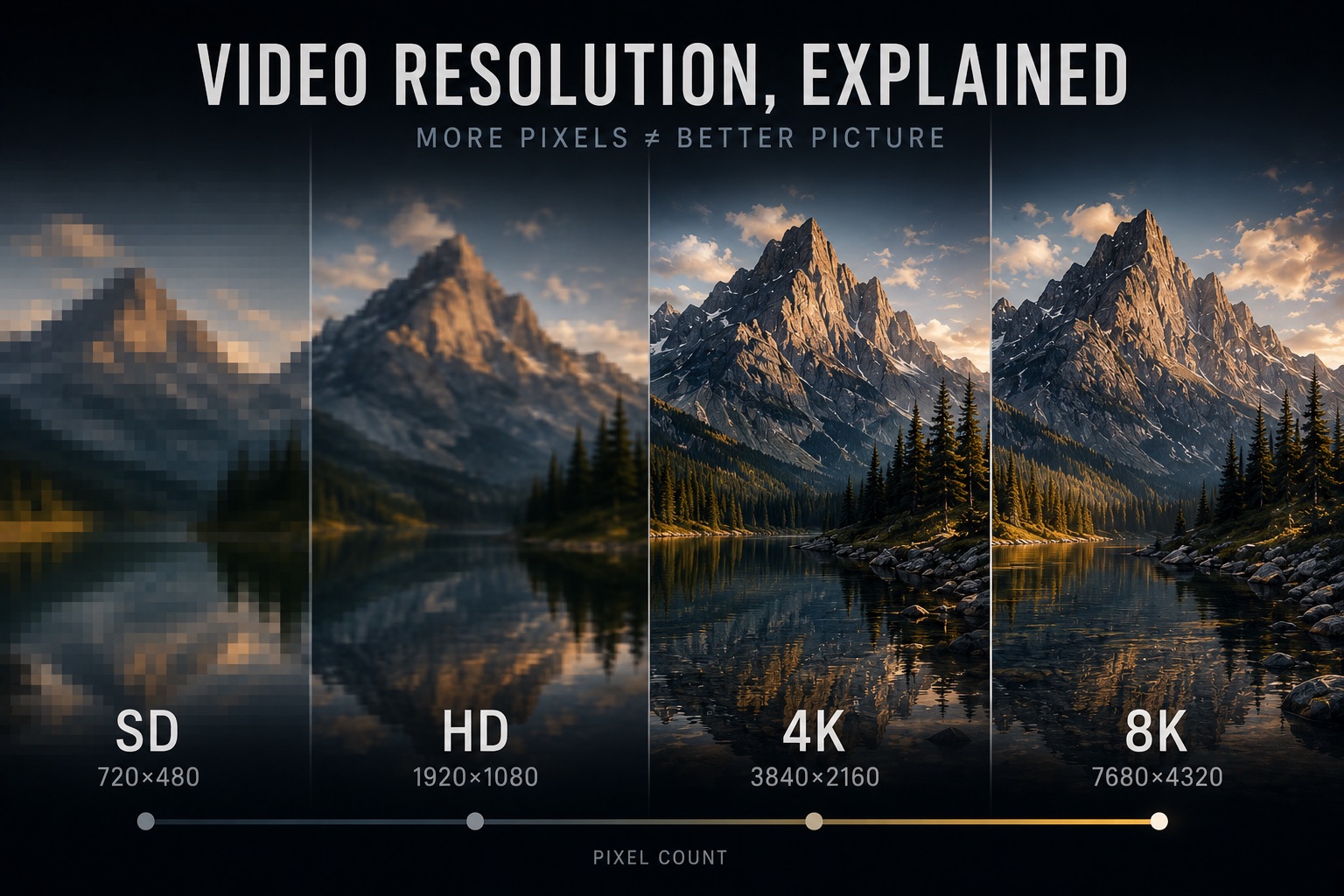
Resolution is the one video spec everyone knows. It's on the camera box, the TV shelf tag, the export dialog, the streaming plan comparison — 1080p, 4K, 8K, always presented as a ladder where higher is simply better.
It's also the most misread number in video. A 4K file can look worse than a good 1080p file. Two files can both say "4K" and not mean the same thing. And the number printed on the box describes a capacity, not a result. Here's what resolution actually measures, what the standard tiers mean, and when more pixels genuinely matter.
What Resolution Actually Measures
Resolution is the size of the pixel grid: width × height. A 1920×1080 frame is a grid of 2,073,600 pixels — about 2.1 megapixels. A 3840×2160 frame is 8,294,400 pixels — about 8.3 megapixels, exactly four times as many.
That's all it measures: how many samples the frame is divided into. It says nothing about how good each sample is. The quality of each pixel depends on how many bits the encoder could spend on it (bitrate), how finely its color was recorded (bit depth and chroma subsampling), and what the lens and sensor delivered in the first place. Resolution is the sampling grid laid over the image — the ceiling on detail, not the detail itself.
Worth calibrating against stills: 8.3 megapixels would be unremarkable for a photo camera, but it's plenty for motion. Film grain, motion blur, and 24 changing frames per second mean video has never needed stills-level pixel counts to look sharp.
The Standard Tiers
| Name | Pixels | Total (approx.) | Where you meet it |
|---|---|---|---|
| SD (NTSC) | 720×480 | 0.35 MP | DVDs, DV tape, legacy broadcast (US/Japan) |
| SD (PAL) | 720×576 | 0.41 MP | DVDs, legacy broadcast (Europe) |
| HD / 720p | 1280×720 | 0.9 MP | Early HD broadcast, lightweight streaming |
| Full HD / 1080p | 1920×1080 | 2.1 MP | Blu-ray, broadcast, the long-time default |
| QHD / 1440p | 2560×1440 | 3.7 MP | Computer monitors, gaming — not a broadcast standard |
| DCI 2K | 2048×1080 | 2.2 MP | Digital cinema projection |
| UHD ("4K") | 3840×2160 | 8.3 MP | 4K TVs, streaming, consumer cameras |
| DCI 4K | 4096×2160 | 8.8 MP | Digital cinema cameras and projection |
| 8K UHD | 7680×4320 | 33.2 MP | Flagship cameras, NHK broadcast trials |
Two patterns worth noticing. First, the big steps quadruple the pixel count: UHD has exactly four times the pixels of 1080p, and 8K four times UHD. Doubling width and height multiplies pixels by four, and that factor of four follows resolution everywhere — into bitrate, storage, and processing cost.
Second, the SD entries have oddly non-16:9 dimensions. Standard definition used non-square pixels — a 720×480 DV frame displays as 4:3 (or 16:9) because each pixel is wider or narrower than it is tall. That's covered properly in the aspect ratio article, but it matters here because it breaks the assumption that storage dimensions tell you the picture's shape.
Why "4K" Means Two Different Things
"4K" started in digital cinema. DCI 4K is 4096×2160 — a container standard from the Digital Cinema Initiatives consortium, with an aspect ratio of about 1.90:1, from which theatrical formats like 1.85:1 and 2.39:1 are cropped.
The consumer world then borrowed the name for UHD, 3840×2160 — exactly double 1920×1080 in each direction, keeping 16:9 so existing HD content scales cleanly. Every "4K" TV, every "4K" streaming tier, and most "4K" camera modes are UHD.
The difference is only 256 pixels of width, but it's real: cinema cameras often offer both (look for "C4K" vs "4K" in the menu), and a DCI 4K clip dropped into a UHD timeline gets scaled or cropped — slightly, silently. The name on the file badge won't tell you which one you have; the actual pixel dimensions will.
1080p, 2160p, 4K — the Naming Flip
Notice that the older tiers are named by height — 480, 720, 1080 — while 4K and 8K are named by approximate width. So 1080p and 2K are nearly the same thing, and "2160p" and "4K" are exactly the same thing. The flip happens mid-ladder, which is why the ladder sounds like a bigger jump than it is: 1080 → 4K reads as "almost 4×" when as heights it's just 1080 → 2160.
The letter matters too. The p in 1080p means progressive — every frame is a complete image, painted top to bottom. The i in 1080i means interlaced — each "frame" is two half-pictures of alternating lines, a bandwidth trick inherited from analog broadcast. Two signals can both say "1080" and differ visibly in motion because one is progressive and one is interlaced. Modern cameras and the entire internet are progressive; interlacing survives mainly in broadcast chains and legacy archives.
More Pixels ≠ A Sharper Picture
Here is the misreading that matters most: resolution sets the ceiling on detail, and everything else decides how close you get to it.
The pixels have to be fed. Every frame passes through an encoder with a bitrate budget. Quadruple the pixels without raising the budget and the encoder spends fewer bits per pixel — softening detail, smearing motion, and introducing exactly the artifacts the extra resolution was supposed to prevent. This is why a heavily compressed "4K" stream can look worse than a well-encoded 1080p Blu-ray: the disc's generous bitrate fills 2 megapixels properly, while the stream starves 8 megapixels. The bitrate article covers this trade in detail.
The pixels have to exist in the first place. A soft lens, a noisy sensor, missed focus, or motion blur puts a ceiling under the ceiling — a 4K recording of a soft image is a large file of soft image. Recording 4K doesn't add detail the optics never delivered.
Sharpness is perceptual. What reads as "sharp" is mostly edge contrast and fine texture rendition, not raw pixel count. A crisp, well-graded 1080p image routinely looks sharper than a flat, noisy 4K one.
Resolution tells you how much detail a file can hold. Whether it actually holds it is decided by everything upstream.
Can You Even See It? — Viewing Distance
The eye has finite resolving power, and the pixels only matter if they subtend an angle you can resolve. The variables are screen size and distance.
On a 55-inch TV at a typical couch distance of 2.5–3 meters, 1080p and 4K are genuinely hard to tell apart — the extra pixels are smaller than your eye can separate. Move the same panel to 1.5 meters, or switch to a 27-inch monitor at arm's length, or hold a phone 30 cm from your face, and the difference becomes plainly visible. This is the entire logic of "retina" displays: pixel density only needs to beat your eye at the distance you actually use the screen.
The practical version: 4K delivery pays off when the screen fills a lot of your field of view — monitors, large TVs viewed close, cinema, VR. For a TV across the room or a video embedded in a webpage, well-encoded 1080p is often visually indistinguishable.
Why Shoot 4K Anyway — Oversampling and Headroom
If 1080p delivery is often enough, why does almost everyone shoot 4K? Because capture resolution and delivery resolution serve different purposes, and extra pixels at capture are workflow headroom:
- Reframing. A 4K capture on a 1080p timeline can be punched in up to 2× with zero quality loss — recomposing a shot, faking a second camera angle, hiding a distraction at the frame edge.
- Stabilization. Software stabilization works by cropping and shifting. Spare resolution is what it crops into; stabilizing native 1080p costs visible sharpness, stabilizing 4K for 1080p delivery is free.
- Oversampling. 4K downscaled to 1080p looks better than native 1080p capture: noise averages out, edges render cleaner, and the chroma detail of a 4:2:0 4K capture lands close to 4:4:4 at 1080p — a real upgrade on chroma-subsampled footage.
- Future-proofing. The archive master outlives the delivery format. Footage shot in 4K today re-delivers cleanly for years; 1080p masters from a decade ago are now the limiting factor in remasters.
The reverse — upscaling — can't reclaim what was never captured. Classic interpolation just produces a smoother large image with no new detail, and ML upscalers invent plausible detail rather than recovering real detail: often fine for delivery polish, but worth being honest about in an archive. Plenty of "4K" files in the wild are upscaled 1080p masters, and the metadata won't confess it.
What the Pixels Cost
The factor of four shows up on every invoice:
- Bitrate and storage. Four times the pixels doesn't demand exactly four times the bitrate — encoders exploit the redundancy in finer detail, so 2–3× is typical — but 4K files are several times larger than 1080p at equivalent quality. This is precisely the pressure that drove H.265 and AV1 adoption, as covered in the codec article: 4K delivery in H.264 is painful, in HEVC it's routine.
- Processing. Four times the pixels to encode, decode, debayer, grade, and render. Editing 4K smoothly is why proxy workflows exist; editing 8K is why they're mandatory.
- The mode trade-off. Camera sensors have finite readout speed, so resolution trades against frame rate — the same camera that shoots 4K at 60fps often shoots 1080p at 240fps. Choosing a recording mode is choosing which kind of detail (spatial vs temporal) the shot needs.
8K deserves a sober note: as a delivery format it outruns human acuity in almost every viewing situation, but as a capture format it's oversampling and reframing headroom taken one tier further — which is exactly how it's mostly used.
Resolution in Metadata — Coded vs Display
Like everything else about a video file, resolution is declared in metadata — and there are more dimensions in there than you'd expect:
Stream #0:0: Video: h264
  Width: 1920, Height: 1080
  Coded width: 1920, Coded height: 1088
  Sample Aspect Ratio: 1:1
  Display Aspect Ratio: 16:9
The coded dimensions are what the codec actually processes: H.264 works in 16×16 macroblocks, and 1080 isn't divisible by 16, so the encoder pads to 1088 and a cropping flag tells the player to show only 1080 lines. Harmless — until a tool reads the wrong field and reports 1088, or worse, displays the padding.
The sample aspect ratio is the non-square-pixel story from earlier: an SD file storing 720×480 with SAR 10:11 displays as 4:3. Read only the storage dimensions and you'll misjudge both the shape and the effective resolution of every SD asset in the library. Anamorphic captures do the same thing at higher resolutions.
So "what resolution is this file?" genuinely has several answers — storage, coded, and display — and tools that conflate them produce the classic mysteries: the 1088-line file, the squashed DV clip, the anamorphic master that previews stretched.
Why Resolution Tags Matter in Your Library
A working library is almost never one resolution. Camera masters in UHD or DCI 4K, proxies in 1080p, legacy assets in SD with non-square pixels, screen recordings at odd monitor dimensions, phone clips in vertical 1080×1920 — all mixed together, all labeled "video."
When VideoTagger indexes a library, the real pixel dimensions of every clip — alongside codec, bitrate, and frame rate — become searchable. That makes it possible to:
- Separate 4K camera masters from 1080p proxies and deliverables at a glance, without opening files
- Catch the DCI 4K (4096×2160) clips hiding among UHD (3840×2160) footage before they're mixed on one timeline
- Surface legacy SD and anamorphic assets whose display shape doesn't match their storage dimensions
- Combine resolution with bitrate to judge actual quality — flagging the suspiciously small "4K" file that's starving for bits, or the storage-hogging master that has a cheaper twin
Resolution is the first number anyone reads off a video file. Making sure it's the right number — real dimensions, correctly interpreted — is the foundation everything else in a library sits on.
Summary
- Resolution is the pixel grid — width × height. It caps how much detail a file can hold; bitrate, optics, and processing decide how much it does hold
- The tiers: SD (720×480/576), 720p, 1080p (2.1 MP), UHD 4K (3840×2160, 8.3 MP), DCI 4K (4096×2160), 8K (33.2 MP) — each 16:9 step is 4× the pixels, and that ×4 follows into bitrate, storage, and processing
- "4K" is two standards: DCI 4096×2160 (cinema) and UHD 3840×2160 (everything consumer) — mixing them on a timeline means silent scaling or cropping
- More pixels ≠ sharper: a starved 4K stream can lose to a well-encoded 1080p disc, and at couch distance the difference may be invisible anyway
- Shooting above delivery resolution buys real headroom — reframing, stabilization, oversampling (4K→1080p approaches 4:4:4 chroma), and future-proof masters; upscaling can only fake the reverse
- A file has storage, coded, and display dimensions (1088-line padding, non-square SD pixels) — reading the wrong one is where resolution mysteries come from
Related articles
HDR, Explained — HDR10, Dolby Vision, HLG, and What "High Dynamic Range" Actually Means
HDR is sold as "brighter, more vivid" — but that marketing hides what's really going on. Here's what dynamic range actually is, why HDR needs PQ or HLG curves and 10-bit color, and how HDR10, Dolby Vision, and HLG differ in one sitting.
Color Spaces, Explained — sRGB, Rec.709, Rec.2020, and DCI-P3
sRGB, Rec.709, Rec.2020, DCI-P3 — these labels appear on cameras, monitors, and delivery specs, but what do they actually mean? Here's the complete map of video color spaces and why they matter for shooting, grading, and delivery.
Video Aspect Ratios, Explained — From 4:3 Television to 2.39:1 Anamorphic
16:9, 2.39:1, 9:16, 4:3, 1.85:1 — each ratio carries history, intent, and a specific look. Here's what every common aspect ratio means, where it came from, and how to choose between them.